Torox - missing points?
Select Torox on your Earn Points page to enter the Torox Offerwall. Click on "My activity" at the top of the page:

If you are on a mobile device, first click on the three bars at the top right to open the menu and then on "My activity".
In the list that now appears, select "Missing Reward?" for the corresponding offer for which you have not received any points:
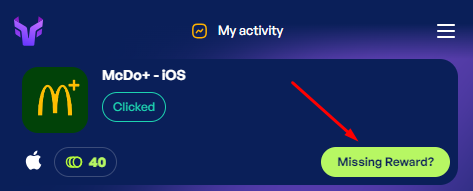
If the button is not displayed there, you may have to wait up to 24 hours before you can create a ticket. During this time, points may be credited with a delay in exceptional cases without any action on your part.
Fill in the form that appears. Enter your e-mail address and the date on which you completed the offer. In the "Optional Info" tab, you can enter additional data that will allow Torox to identify your participation: this can be, for example, the e-mail you used for the offer or a user ID/username within the offer (this is not necessarily your CodesFree.net data).
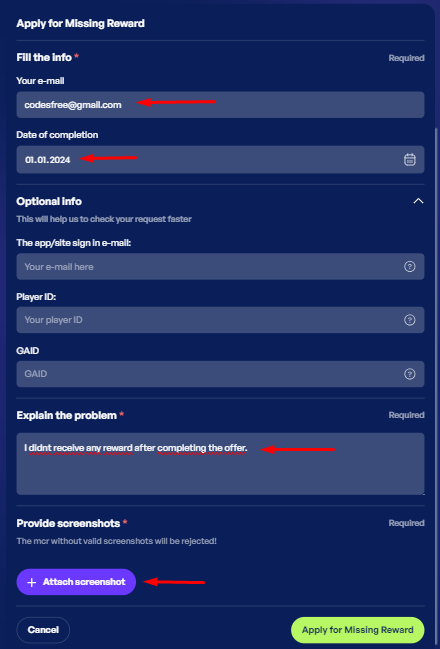
In addition, you add a screenshot that shows that you have fulfilled the conditions of the offer, e.g. a screenshot of a confirmation email or a screenshot of the app on which the level to be achieved or similar is visible. Then click on "Apply for Missing Reward".
After submitting, Torox will take care of your request and inform you as soon as there are any news or queries. As there are often many parties involved in this process, it may take some time to investigate.